


WeMuslim: Muslim, Prayer&Qibla
4.226.00 Reviews
App Specs
- Version
- 1.4.1
- Updated On
- License
- Free
- Downloads
- 5,000,000+
- Developer
- Metaverse Technology FZ-LLC
- Categories
- Lifestyle
- Platform
- Android
Screenshots
 Analysis by AppCompare
If you want one place to check daily prayer times and keep a few familiar Muslim practices close at hand, WeMuslim is designed to bring those tools together. I’d recommend approaching it as a practical companion rather than a complete replacement for every religious resource you use. Its appeal is straightforward: prayer-time guidance, an athan, a Qibla direction, and Quran access sit within a lifestyle app, so a first-time user can begin with one immediate need instead of having to explore everything at once.
The first useful step is to decide what you want the app to do for you today. If you are trying to work out when the next prayer begins, start with prayer times. If you are somewhere unfamiliar, look for the Qibla tool. If you already know your routine, Quran access may be the more natural starting point. That small choice makes the first visit feel less like setting up a large service and more like solving a real, everyday problem.
What to expect from the app
WeMuslim is a free lifestyle app from Metaverse Technology FZ-LLC. It has an average rating of 4.2 from around 20,000 ratings, and it has been installed over 5 million times. Those figures suggest that it has found a substantial audience, but they cannot tell you whether its particular approach suits your routine. I’d judge it by whether its central tools are convenient and clear for the way you practise.
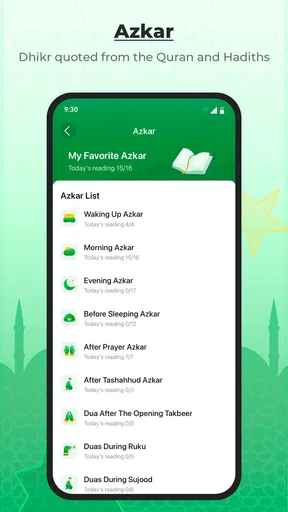
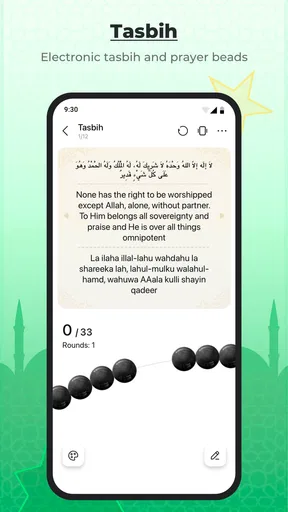
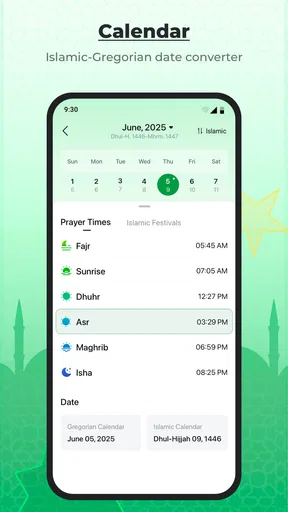
The app’s main value is having several common needs close together: prayer times, athan, Qibla direction, and Quran. That is useful if you currently jump between a clock, a direction tool, and a separate reading app. Keeping the basics in one place can reduce that small but repeated friction, especially when you are away from your usual surroundings.
At the same time, a collection of tools is not automatically better than a focused app. Someone who only wants a prayer timetable may prefer a simpler option that opens directly to that view. Likewise, if you already have a Quran app whose reading layout and recitation options you like, there is little reason to switch solely because another app includes Quran access. I see WeMuslim as most compelling for people who value convenience across these tasks.
The app is rated for Everyone, and its current version is 1.4.1. It was released on May 30, 2025, and supports Android 6.0 or later. If you are deciding whether it belongs on a family member’s phone or an older Android device, those are useful starting points. The age rating is not a substitute for deciding what content and screen time are appropriate for your household, but it does make clear that the app is not presented as adult-only.
Start with the need you have right now
When you first open a multi-tool app, it is tempting to tap around until every section feels familiar. I would resist that. Pick one immediate task and complete it first. For a new user, a sensible first success is finding the next prayer time and checking that the displayed schedule makes sense for their location and expectations. Once that feels dependable, the other tools are easier to assess without confusing setup questions with everyday use.
Worth Reading Before You Choose

Flipboard Shows What News Apps Must Do Beyond the Feed

Switching to Android Auto Means Rethinking Your Driving Routine

Google Calendar Makes a Crowded Week Easier to Manage

Ludo King Makes the Most of the Minutes Between Plans

Baby Panda World Brings Quick Play to Modern Phones, but Its Game Library Feels Busy

ESPN’s Live Game View Makes Following Close Games Easier
That approach also helps you decide whether you want the app to become part of your daily routine. A person who checks the next prayer time before arranging a commute may need little more than the timetable and a reminder. Someone travelling may care more about the Qibla tool. A reader may open Quran access regularly but barely use the direction feature. You do not need to treat every included tool as equally important.
Make the first setup deliberate
After installing WeMuslim, take a moment to get the location context right before relying on prayer times or direction guidance. These tools depend on where you are, so a schedule or compass result that looks unexpected is a reason to check the app’s location context and your phone’s location settings before assuming the tool itself is wrong. If you prefer not to grant location access, look for a way to choose or confirm a place manually if the app offers one in your version; do not assume that every device presents setup in the same way.
It is worth checking the result against a source you already trust, particularly when you are setting up the app in a new city. Prayer-time conventions can differ, and local communities may follow a particular timetable. The practical test is not whether a screen looks polished; it is whether its times align with the guidance you intend to follow. If there is a mismatch, use your established local source rather than changing your routine around a figure you have not verified.
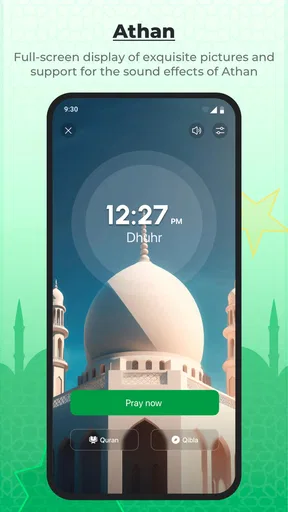
For the athan, think about where and when you use your phone before relying on an alert. A sound that is helpful at home may be disruptive in a workplace, classroom, or shared room. Check the app’s available alert controls and your phone’s sound settings, then choose an arrangement that suits your surroundings. I would make one test during a quiet moment instead of discovering the notification behaviour in the middle of a meeting.
Your first meaningful success: check, then use
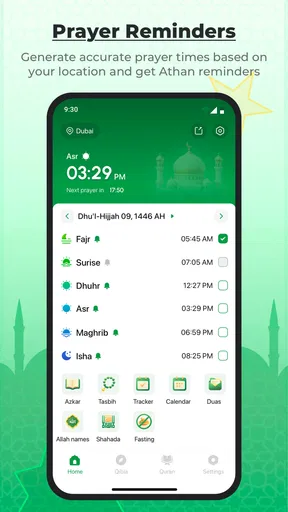
A reassuring first session can be simple: open the prayer-time view, identify the next prayer, and compare the listed time with the timetable you normally use. If the times look right, you have confirmed the part most likely to bring you back each day. Then try the Qibla tool while you are stationary. Give the phone a moment to settle and follow any on-screen guidance rather than turning quickly and treating the first direction it indicates as final.
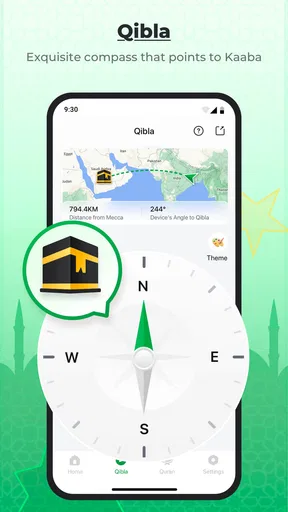
That last detail matters in ordinary use. A phone’s direction reading can be affected by how it is held and by the surrounding environment, so I would use the Qibla feature as a convenient guide, not as a reason to skip common sense. If the result seems inconsistent, move away from nearby objects that may affect the phone’s sensors, hold it steadily, and check again. When accuracy matters to you, confirm with a method you trust.
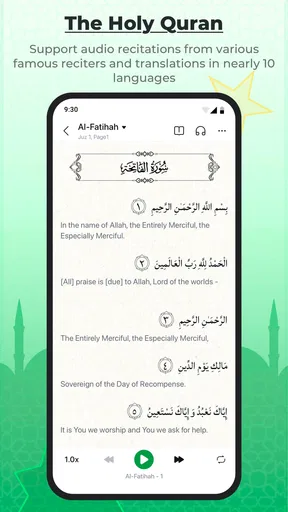
For Quran access, make your first visit an intentional one: open the reading area and see whether its presentation is comfortable for your eyes and habits. I would not assume that every reader wants the same format or that an included Quran tool will replace a dedicated reading app. If you already have a preferred way to read, compare the experience before moving your regular study into a new app.
Everyday use without extra fuss
Imagine leaving home for a day of errands in an unfamiliar part of town. You can check the prayer schedule before planning a break, then use the Qibla tool when you need to orient yourself. Back at home, you might turn to Quran access without opening a separate app. That is the kind of small, connected workflow where WeMuslim makes sense: not a dramatic change in practice, but fewer separate places to visit for common tasks.
A different routine may be better served by keeping the app focused. If you only need prayer times, make that the first screen you check and avoid spending time configuring tools you will not use. If you are mainly interested in Quran reading, test that experience on its own merits. An app can be useful without becoming the centre of every part of your religious life.
One practical tip is to establish a simple check-in habit rather than relying on an alert as your only cue. For example, glance at the schedule when planning the day, then use the athan as an additional prompt if its behaviour suits your environment. This gives you a fallback if your phone is muted or an alert is inconvenient. It also keeps the app’s role clear: helpful support, not the sole authority for your timetable.
Common points of confusion
If a prayer time differs from what you expect, first check whether you are comparing the same location and the same local practice. A difference does not necessarily mean that one display is broken. For a user who follows a local mosque or community timetable, that source should remain the reference point. Use the app for convenience when it agrees with your practice, and avoid assuming that a single schedule will suit every community.
If the Qibla direction appears to drift, do not immediately conclude that the app is unusable. A phone’s compass needs a stable reading, and the way you hold the device can matter. Try again in a different spot and compare with another trusted method if the result remains unclear. For someone who needs a dependable direction in a particular setting, a dedicated compass or a local reference may be the better choice.
Notifications can also cause confusion because the phone’s sound mode and the app’s own controls both shape what you hear. If you expect an athan and do not hear one, check the phone’s notification and volume settings as well as the app’s options. If it sounds at a bad time, adjust the setup instead of abandoning the whole app. I would treat alerts as a convenience to tune, not as a feature that must be left on in every situation.
Finally, do not judge the whole app by a feature you will never use. The bundled format is its central trade-off: it can make routine tasks easier, but it may feel less focused than a dedicated prayer-time, direction, or Quran app. If you are particular about a reading interface or depend on a specific local timetable, keep your existing specialist tool and use WeMuslim only where it adds convenience.
Who is likely to get the most from it?
I think WeMuslim is a good fit for someone who wants familiar daily tools gathered together and is happy to verify the initial setup. It is especially practical for a person whose needs change through the day: checking times at home, finding direction while travelling, and opening Quran access when there is time to read. The free price also makes it easy to try without having to make a purchase decision first.
It may be less suitable if you want a highly specialised experience in just one area. A user who already trusts a local prayer timetable and only needs that schedule may find a dedicated timetable app more direct. Someone who is particular about Quran reading features should compare the reading experience with their existing choice before switching. And anyone who prefers not to use a location-aware workflow should take care to understand how location is handled on their device and whether the app can still serve their needs.
For a first-time user, I would keep the next step modest: install it on a compatible Android device, confirm the location context, check one prayer time against a trusted source, and try the Qibla direction while stationary. If those first checks feel clear, explore the athan and Quran tools at your own pace. If they do not match your routine, there is no need to force a one-app solution.
My overall view is that WeMuslim is worth considering as a convenient starting point for everyday Muslim life tools, particularly when you want several basics close together. Its strongest case is practical breadth; its main compromise is that a bundled app will not necessarily satisfy someone seeking a specialist experience. Start with the task you need today, verify the result that matters, and let your own routine decide whether it earns a regular place on your phone.
Pros
- Includes prayer times and reminders to help maintain a daily worship routine.
- Qibla compass makes it easy to find the direction of prayer.
- Offers Quran reading and audio recitation in one app.
- Useful Islamic calendar features help track important dates.
- Combines several faith-related tools
- reducing the need for separate apps.
Cons
- Prayer times may need location access and can vary by calculation method.
- Qibla accuracy depends on device sensors and a clear location signal.
- Some features or content may require an internet connection.
- Notifications can become distracting if several reminders are enabled.
- The app may request sensitive permissions
- so review access settings before use.
FAQs for WeMuslim: Muslim, Prayer&Qibla
What is WeMuslim: Muslim, Prayer&Qibla?
WeMuslim is an Islamic lifestyle app that brings together tools for everyday religious practice. Depending on the features available in your region and app version, it can help you check prayer times, find the Qibla direction, read the Quran, and access other Islamic content. Its tools are designed for convenience, but users may want to review the app’s settings and local accuracy before relying on it for daily routines.
How accurate are WeMuslim’s prayer times and Qibla direction?
Prayer times can vary according to your location, calculation method, and local convention. WeMuslim may use your device’s location or let you enter a place manually, and its settings can affect the displayed schedule. Qibla direction also depends on location and the device’s compass, which may need calibration. For important observances, compare the app with a trusted local mosque or Islamic authority.
Does WeMuslim require location access, and can I use it without sharing my location?
Location access can make nearby prayer times and Qibla guidance more convenient, but you may be able to enter a city or location manually instead. Available options can differ by device and app version. If privacy is important to you, check the permission prompts before enabling access, review the app’s privacy information, and confirm whether location permission can be limited in your phone’s settings.
Can I read or listen to the Quran in WeMuslim without an internet connection?
Offline access depends on which Quran text, audio, or other resources the app offers and whether you have downloaded them in advance. Some content may require an internet connection, while other materials may remain available after downloading. Before traveling or relying on offline use, open the relevant section while connected and check its download options; availability can also vary by language and app version.
Is WeMuslim free to download, and are there ads or paid features?
The app’s download price, advertising, and optional purchases may depend on your platform, country, and current version. Check its Google Play or App Store listing for the latest details, including in-app purchases and subscription terms, before installing. If the app offers premium features, review what is included and how billing or cancellation works so you can decide whether the free version meets your needs.


